Play FLAC on Your Mac
Apple's Music app doesn't know what to do with FLAC. Here is how to listen to your lossless files anyway, straight from the folder, without converting and with a waveform.
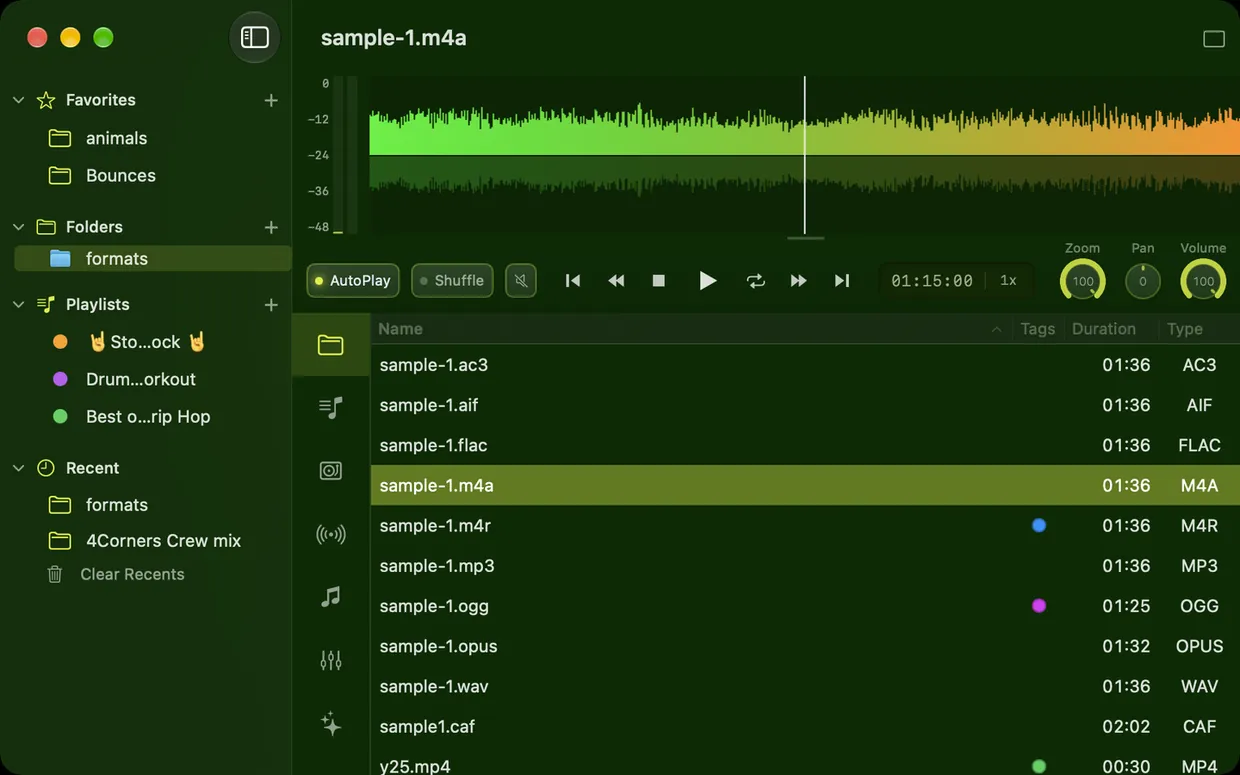
A folder with FLAC, WAV, AIFF, OGG, Opus and other formats in Ampado
You bought albums as FLAC, maybe on Bandcamp or Qobuz, or ripped your CDs losslessly. On your Mac you try to drag them into the Music app and find out: FLAC won't be imported. Many guides then tell you to convert to Apple Lossless or AIFF. That takes time and storage, and in the end you have every file twice.
There is an easier way. With a player that understands FLAC directly, you open the folder and start listening. In this article you will learn what lossless means, which formats exist and how to play them on your Mac with Ampado.
What does lossless mean?
Formats like MP3 or AAC save space by leaving out parts of the signal that supposedly can't be heard. This is called lossy. Lossless formats, on the other hand, compress like a ZIP archive: the file gets smaller, but on playback you get exactly the original, bit for bit.
That is why a FLAC file is usually only about half the size of the same recording as WAV and still sounds identical. Compared to an MP3 it is much larger, but nothing is missing.
The most important lossless formats
- •FLAC (Free Lossless Audio Codec). The standard for lossless music, open and widely used. Almost every shop for hi-res downloads offers FLAC.
- •ALAC (Apple Lossless). Apple's counterpart to FLAC, usually in files with the .m4a extension. The Music app supports ALAC, but not FLAC.
- •WAV and AIFF. Uncompressed audio, just as it comes out of your DAW or recorder. Maximum compatibility, but the largest files.
- •CAF (Core Audio Format). Apple's container format, mostly known from Logic, GarageBand and developer tools.
On top of that there are lossy formats like MP3, AAC, OGG and Opus. Ampado plays them all: MP3, WAV, FLAC, AIFF, AIF, AAC, M4A, M4R, AC3, OGG, Opus, MP4 and CAF.
How to play FLAC on your Mac
- 1.Download Ampado (lite) for free from the Mac App Store.
- 2.Open the folder with your music. You can also simply drag it onto the Ampado window or the Dock icon. No import needed, Ampado shows the files straight from the folder.
- 3.Double-click a track and it plays. The waveform shows you the whole song at a glance, and one click takes you to any point.
- 4.Optional: make Ampado the default app for FLAC. In the Finder, right-click a FLAC file, choose “Get Info”, select Ampado under “Open with” and click “Change All”.
Title, artist, album, genre and other tags of your FLAC files appear right in the file list, even in the free version. You can customize the columns and sort by any of them. To edit the tags, use the tag editor in Ampado PRO.
Why you don't need to convert
Converting FLAC to Apple Lossless is lossless, but it is a hassle. You need an extra app and twice the storage, or you have to delete the originals. And with every new album you start all over again.
Ampado is folder-based. Your files stay as and where they are, whether on the internal SSD or an external drive. You open the folder and listen. Why it makes such a difference to see your music as well, you can read in Why Seeing Your Sound Changes Everything.
Is it really lossless? A quick look
Not every FLAC file is truly lossless. Sometimes an MP3 was simply converted to FLAC. The file is then large, but only has the quality of the MP3.
The Frequency Landscape in the Visuals of Ampado PRO gives you a first hint. It shows the spectrum as a 3D landscape up to half the sample rate, so up to around 22 kHz at CD quality. MP3 and AAC files usually cut off the highest frequencies, often above about 16 kHz. If a FLAC file constantly shows an empty zone in the high frequencies, that hints at a converted MP3. It doesn't replace an exact measurement, but it is enough for a quick suspicion.
More than just playback
Ampado (lite) plays all formats for free, with waveform, cover art and level meter. Ampado PRO adds the 10+1 band equalizer, the Visuals, the choice of audio output device, for example an audio interface or an external DAC, and loudness analysis with LUFS and True Peak. And if you do need Apple Lossless at some point, for the Music app for example: Ampado PRO can also export your files as ALAC (M4A).
Frequently asked questions
Can a Mac play FLAC without extra software?
Only to a limited extent. The Music app doesn't import FLAC files. With a player like Ampado you play FLAC straight from the folder, without converting.
Does FLAC sound better than MP3?
FLAC contains the complete original, MP3 leaves parts out. Whether you can hear the difference depends on the recording, your headphones or speakers and your ears. For archiving, FLAC is the safe choice: you can always make an MP3 from a FLAC, but not the other way round.
Is Ampado free for FLAC?
Yes. Ampado (lite) plays FLAC and all other supported formats for free, with no sign-up and no subscription. Ampado PRO is a one-time purchase and adds the equalizer, visualizers, playlists and much more.
Does it also work with files on an external drive?
Yes. Simply open the folder on the drive. Ampado reads the files directly from there, nothing is copied.
Try it for free
Ampado (lite) is free on the Mac App Store. It plays FLAC, WAV, AIFF, Apple Lossless and many other formats with a real-time waveform. See what the PRO version adds in the comparison on the home page.