Why Seeing Your Sound Changes Everything
Most music players treat audio as a black box. You press play, you hear sound, and that's it. But what if you could actually see what you're listening to?
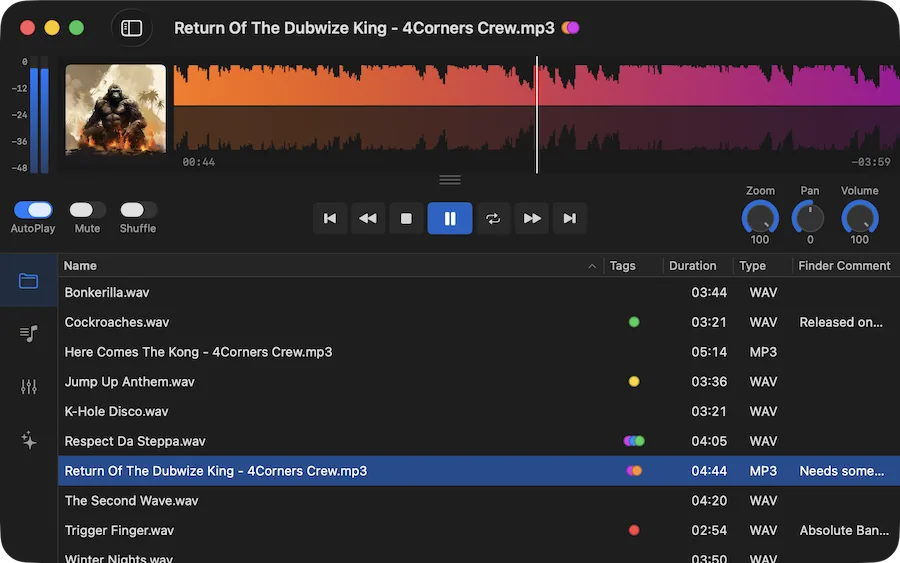
Ampado PRO waveform display with markers and regions
We all have local audio files — whether it's a carefully curated music library, field recordings, podcast episodes, DJ sets or production samples. Yet most players on macOS give you nothing more than a play button and a progress bar. You're essentially listening blind.
Ampado takes a different approach. It makes sound visible. And once you see your audio as a waveform, you'll never want to go back.
The Problem with Invisible Audio
Think about how you interact with a traditional music player. You hit play and wait. Want to skip to the drop? You drag a tiny slider and hope for the best. Looking for that one quiet part in a long recording? Good luck scrubbing through 45 minutes of audio with a 200-pixel progress bar.
This is the core problem: without visual feedback, navigating audio is guesswork. Producers, DJs and music enthusiasts have known this for decades — that's why every professional audio tool shows waveforms. Ampado brings that same power to everyday listening.
What a Waveform Actually Tells You
A waveform is a visual map of your audio. Loud sections appear tall, quiet sections appear small. You can instantly see the structure of a track — the intro, the build-up, the drop, the breakdown, the outro. For spoken word, you can spot pauses, chapters and transitions at a glance.
- • Spot the loud chorus and the quiet bridge without listening through the whole track
- • Jump to any point in a file by clicking directly on the waveform
- • Zoom into details to see individual beats and transients
- • Set markers and regions to bookmark interesting sections for later
Your Local Files Deserve Better
Streaming services have trained us to accept minimal playback interfaces. But your local files are different — you own them, you've collected them, and you should be able to explore them properly. Whether you have a folder of vinyl rips, a sample library, lecture recordings or your entire music collection in FLAC, these files deserve more than a basic play/pause button.
Ampado is folder-based, so there's no import step and no library management overhead. Just point it at a folder and your files are ready to play — complete with waveform, metadata and cover art. It feels as natural as browsing files in Finder, but with a powerful audio engine behind it.
Beyond the Waveform: Visualizer Plugins
If waveforms are the practical side of seeing sound, visualizer plugins are the beautiful side. Ampado PRO includes shader-based visualizations that react to your music in real time — colorful, immersive and endlessly mesmerizing. Render them fullscreen and turn your Mac into a visual sound experience.
Combined with the 10+1 band equalizer, you can shape both what you hear and what you see. It's a listening experience that no streaming service can match.
Try it yourself
Ampado (lite) is free and already includes the waveform player. Download it from the Mac App Store and see what you've been missing. Ready for the full experience? Ampado PRO adds playlists, visualizers, markers, EQ and much more — as a one-time purchase with no subscription.
See Your Sound
Sound visualization isn't just a nice-to-have — it fundamentally changes how you interact with audio. You navigate faster, understand your files better and discover details you'd otherwise miss. Ampado was built on this idea: that seeing your sound makes everything better.