Auto DJ for Mac: Your Songs, Mixed Automatically
The party mode in Ampado PRO turns a list of songs into a continuous mix. With crossfades, BPM matching and effects you can play with yourself.
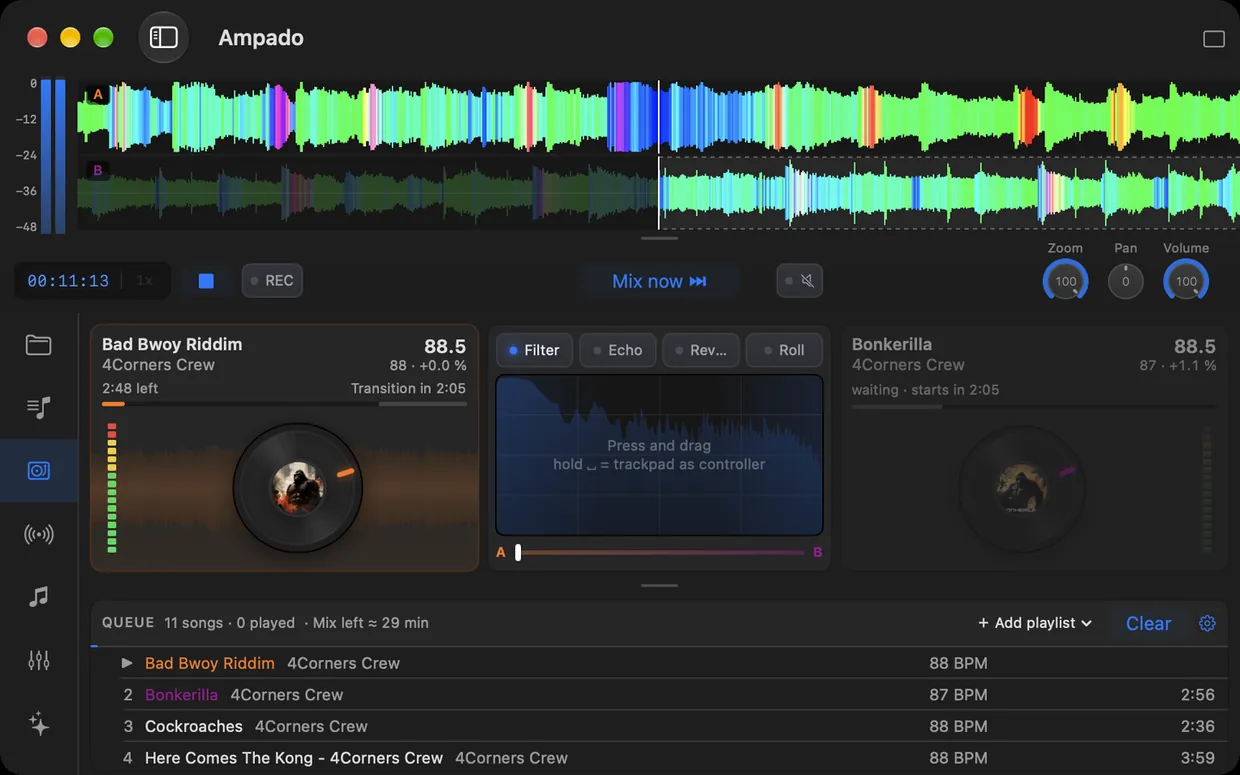
A regular playlist plays one song after another. Between tracks you get gaps, tempo jumps and hard cuts. For a party, a workout or an evening with friends, though, you want the music to just keep flowing.
That is exactly what the Auto DJ in Ampado PRO 6 is for. Drag songs or whole playlists into the queue and Ampado mixes them like a DJ: transitions are crossfaded and the tempo of the next song is matched to the one playing. No DJ software and no subscription needed. The Auto DJ works with your own music files.
What the Auto DJ is good for
- •Parties. Add a playlist, start the mix, done. The music keeps going without anyone standing at the laptop.
- •Workouts and running. A steady flow without gaps, the tempo stays stable from song to song.
- •Background music. For a café, a shop or dinner: a continuous mix from your own collection.
- •DJ prep. Hear how tracks blend into each other before you play them live. The waveforms with frequency colors show you bass, mids and highs on both decks.
How the Auto DJ works
- 1.Open the Auto DJ in the sidebar and drag songs into the queue, or add a whole playlist at once.
- 2.Choose the order: fixed, exactly as in the queue, or smart. Then start the mix.
- 3.The Auto DJ crossfades from one deck to the next and matches the tempo. You can see on the deck when the next transition is coming.
- 4.Want to step in? Start the transition right away with one click. Control filter, echo, reverb and roll with the effect pad, the spin wheels or the trackpad.
At the top, the waveforms of both decks run on top of each other in frequency colors. So you can see before the transition where the bass and drums kick in on the next song. You can also show the running mix in any compact mode, and the List mode then shows the DJ queue.
An Auto DJ without a subscription
Many DJ apps for Mac rely on subscriptions. The Auto DJ in Ampado works with the files you already have: MP3, WAV, FLAC, AIFF, AAC and more, straight from your folders, with no import and no library.
You buy Ampado PRO once on the Mac App Store. The Auto DJ is included, just like LUFS analysis, visualizers, the equalizer, markers and the tag editor. See what other apps cost in the price comparison.
Frequently asked questions
Do I need DJ skills to use the Auto DJ?
No. You only decide which songs are played. The Auto DJ handles crossfades and tempo matching by itself. If you like, you can step in with the effects or an instant transition.
Which files can the Auto DJ mix?
Your own audio files, for example MP3, WAV, FLAC or AIFF. The songs come straight from your folders or playlists, no import needed.
How does the Auto DJ match the tempo?
Ampado knows the BPM of your songs and matches the tempo of the next song to the one playing during the transition. You can see the BPM of each deck and the adjustment right in the display.
Can I set the order of the songs?
Yes. In fixed order, the Auto DJ plays the queue exactly as you set it up. In smart order, Ampado puts the order together itself.
Is the Auto DJ included in the free version?
No, the Auto DJ is part of Ampado PRO, a one-time purchase with no subscription. The free version, Ampado (lite), includes the waveform, internet radio and Apple Music, but not the Auto DJ.
Part of Ampado PRO
The Auto DJ is included in Ampado PRO from version 6. One-time purchase for $7.99, no subscription. If you already own PRO, you get it with the free update.
See all new features of version 6 on the home page, and tips and guides on the blog.