Edit MP3 Tags on Mac – No Extra Software Needed
Ampado PRO now includes a full-featured Tag Editor. Title, artist, album, cover art and more – edit everything right inside the player, even for multiple files at once.
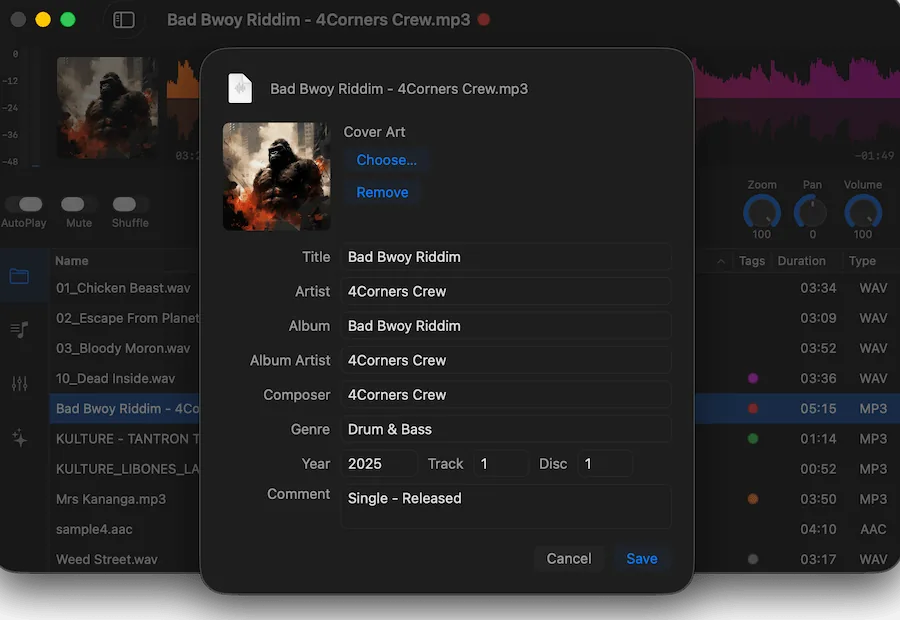
The new Tag Editor in Ampado PRO – edit metadata and cover art right inside the player
Anyone managing audio files on Mac knows the problem: tags are wrong, the cover is missing, and editing requires a separate program. Until now. With the new Tag Editor in Ampado PRO, switching between your player and tag software is a thing of the past.
The Tag Editor is available now as a PRO feature and lets you edit metadata like title, artist, album, genre, year and more directly in Ampado – individually or for multiple files at once. No extra app, no export, no detours.
Why Clean Tags Matter
Audio metadata is more than just info text. It determines how your music is displayed in every player, on every device and in every library:
- • Sorting & Search – Without correct tags, you'll never find anything in a large collection. Artist, album and genre are the foundation of any useful library
- • Cross-device – Tags travel with the file. Whether it's Mac, iPhone or a DJ controller – the info is always there
- • Professional Workflow – Producers and DJs work with hundreds of files. Consistent metadata saves time and avoids chaos
- • Cover Art – A missing cover stands out immediately. With embedded artwork, your collection looks professional on every device
Until now, this required a separate tool – often without integration into your actual workflow. Ampado now solves this right inside the player.
What You Can Edit
The Tag Editor in Ampado PRO supports all common metadata fields. Open the editor via the context menu of a file or via shortcut:
- • Title, Artist, Album – The basics. Edit them individually or change the artist for an entire album at once
- • Album Artist, Composer – Essential for compilations and classical music, where artist and album artist differ
- • Genre, Year, Track, Disc – For correct sorting and complete display in any library
- • Comment – Ideal for your own notes like "Special Remix by XY" or "Demo Version"
All changes are saved in a standardised way inside the file – compatible with ID3 (MP3), Vorbis Comments (FLAC/OGG), MP4 tags and more formats.
Cover Art: More Than Just an Image
The Tag Editor makes cover management as simple as possible. You can use images in almost any format – Ampado takes care of the rest:
- • All Image Formats – JPG, PNG, TIFF, HEIC, RAW and many more. No need to convert anything first
- • Freely Positionable – The image isn't simply scaled. You can choose the crop area before it's trimmed to a square
- • Directly Embedded – The cover is written into the audio file and is therefore available everywhere – no external image file needed
- • Remove Cover – One click on "Remove" deletes the embedded cover if you want to replace or remove it
Especially handy: you can add a cover image via drag-and-drop or the "Choose" dialog and adjust the crop in the preview.
Batch Editing: Multiple Files at Once
One of the biggest advantages of the Tag Editor in Ampado is the multi-batch function. Instead of opening each file individually, you can make changes to multiple files at once:
- • Select Multiple Files – Select multiple tracks in the playlist and open the Tag Editor. Fields that are identical across all files are pre-filled
- • Change Shared Fields – Change the album name or genre for all selected files at once. Fields you leave empty remain unchanged
- • Set Cover for All – Choose a cover image and it will be embedded in all selected files – perfect for complete albums
Batch editing saves a huge amount of time, especially when you've just imported new tracks or want to clean up an existing collection.
Pro Tips
- • Tag First, Sort Later – Get your tags in order before creating playlists. Clean metadata makes searching and sorting much easier
- • Use High-Resolution Covers – Use covers with at least 500×500 pixels. Ampado automatically optimises the image for embedding, but the better the source material, the better the result
- • Use the Comment Field – The comment field is perfect for personal notes that travel with the file – e.g. "Live Recording", "Mastered" or "Needs EQ Fix"
PRO Feature
The Tag Editor is available in Ampado PRO. The free version (lite) includes the audio player but not the Tag Editor. Ampado PRO is a one-time purchase with no subscription – available on the Mac App Store.