The Best Music Players for Mac in 2026
Eight music players compared, from the preinstalled Music app to the hi-fi player for audiophiles. With current prices, honest strengths and weaknesses, and a recommendation for who each player suits.
As of November 2026. Prices of App Store apps are updated automatically every day.
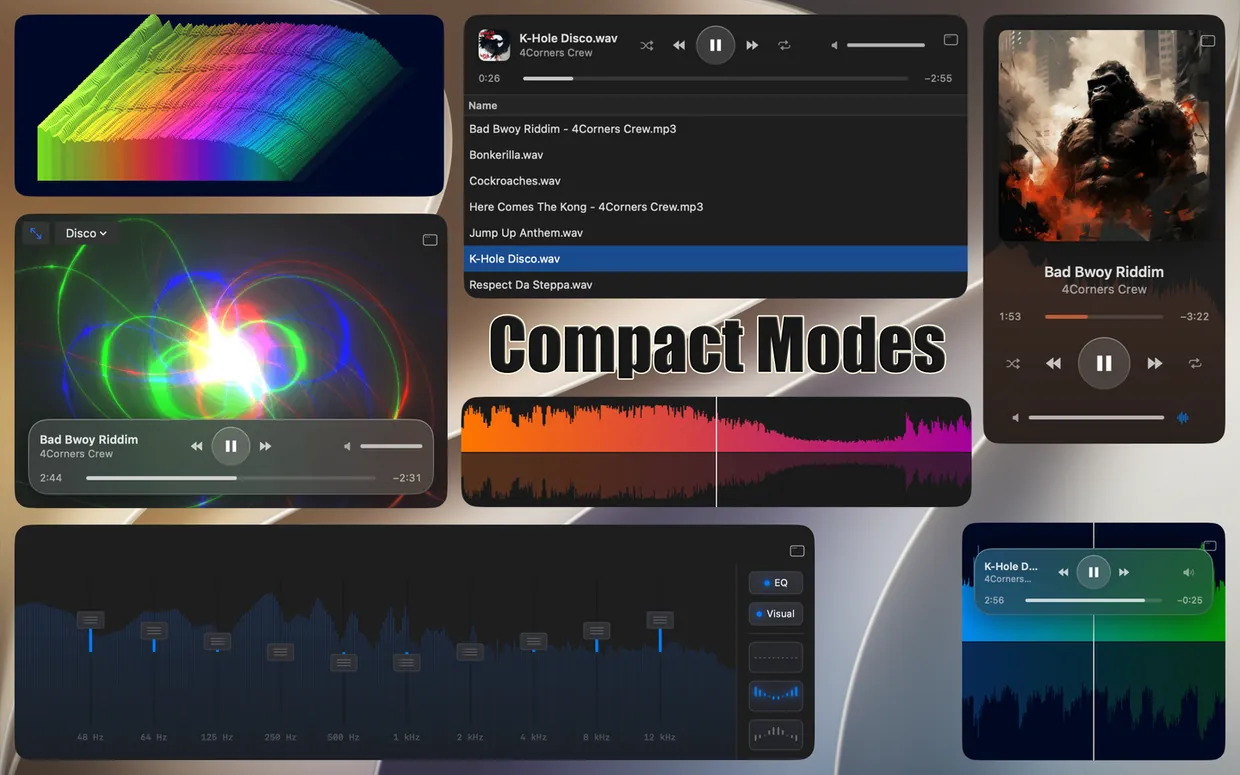
The compact modes of Ampado PRO
Every Mac comes with the Music app. For many people it is enough, especially for Apple Music. But as soon as you want to play your own files, FLAC albums, DJ sets, bounces from your DAW or just a folder full of MP3s, you quickly hit its limits: no FLAC, everything has to go into the library, and there are no tools for close listening.
Fortunately there are alternatives, and they are very different. Some manage large libraries, others play hi-res audio bit-perfect, and others show you your music as a waveform. We compared eight well-known players. Ampado is our own app, and we say so openly. That is why we try to give a fair assessment, including the weaknesses.
The music players at a glance
| App | Price | FLAC | Best for |
|---|---|---|---|
| Ampado PRO | $7.99 one-time, lite version free | Yes | Seeing music: waveform, visualizers, Auto-DJ, LUFS |
| Apple Music app | included with macOS | No | Apple Music and iCloud library |
| Swinsian | $34.95 (website) | Yes | Large libraries, former iTunes users |
| VOX | free, Premium subscription from $4.99 | Yes | Hi-res music with cloud sync |
| Colibri | $19.99 one-time | Yes | Lean, bit-perfect playback |
| Fidelia | trial, full version $99.99 one-time | Yes | Audiophiles with a hi-fi system |
| VLC | free | Yes | Plays almost anything |
| IINA | free | Yes | Modern Mac look for videos |
Prices according to the Mac App Store (updated daily) or the developer’s website. Subscription prices: cheapest plan. You can also find an overview of the costs compared to Ampado PRO in the price comparison on the home page.
1. Ampado PRO
Ampado is a visual music player: every song appears as a real-time waveform that you can zoom into and jump to any position with one click. Ampado is folder-based, you simply open a folder and listen. On top of that there are visualizers, a 10+1-band equalizer with custom presets, markers and regions, a Tag Editor, BPM analysis, internet radio and Apple Music. New in version 6: an Auto-DJ that mixes your songs with crossfades, and loudness analysis with LUFS and True Peak.
- Strengths:Waveform and visualizers, fast even with large folders, lots of tools for DJs, producers and musicians, five compact modes, one-time purchase without subscription, free lite version.
- Weaknesses:Folder-based instead of a library: if you want a searchable library of your whole collection with smart playlists, a library app is the better choice. Ampado does not play DSD and APE files.
- Price:$7.99 one-time, lite version free
2. Apple Music app
The Music app comes preinstalled on every Mac and is the successor to iTunes. It is the first choice for Apple Music and syncs your library with iPhone and iPad via iCloud.
- Strengths:Preinstalled, perfectly integrated into the Apple ecosystem, Apple Music streaming, sync with iPhone and iPad.
- Weaknesses:Does not play FLAC, OGG or Opus. Everything goes through the library, you cannot simply open a folder and play it. How to listen to FLAC anyway is explained in Play FLAC on Your Mac.
- Price:included with macOS
3. Swinsian
Swinsian is a classic library player aimed at everyone who misses the old iTunes. It handles many formats, including FLAC, Ogg Vorbis, Opus, APE and DSF, and is sold through the developer’s website.
- Strengths:Library with smart playlists and folder watching, equalizer with 10 or 31 bands, gapless playback, automatic sample rate switching, CUE files, Last.fm.
- Weaknesses:Not available in the Mac App Store. No waveform and no visualizers, the focus is on managing your collection.
- Price:$34.95 (website)
4. VOX
VOX is a popular hi-res player for Mac and iPhone. It plays many lossless and lossy formats, including FLAC, APE and DSD, and with VOX Premium it offers a cloud that syncs your music collection between your devices.
- Strengths:Many formats, gapless playback, equalizer with presets, crossfade, internet radio, Last.fm, playlists in M3U, PLS, XSPF and CUE format.
- Weaknesses:The cloud and other premium features require a subscription. No waveform for navigating within a song.
- Price:free, Premium subscription from $4.99
5. Colibri
Colibri is a lean, native player for lossless audio. It focuses on bit-perfect playback, needs very little processing power and supports APE, WavPack and DSD in addition to FLAC and ALAC.
- Strengths:Bit-perfect playback, automatic sample rate switching, gapless playback even with CUE files, 10-band equalizer, AirPlay 2, very lightweight.
- Weaknesses:Deliberately minimalist: no library, no waveform, no visualizers.
- Price:$19.99 one-time
6. Fidelia
Fidelia is aimed at audiophiles. The player offers bit-perfect playback in exclusive mode, DSD up to DSD512, multichannel audio, Audio Unit plugins and output to network players via UPnP.
- Strengths:Bit-perfect exclusive mode, DSD, Audio Unit plugins, 10-band equalizer with AutoEQ profiles, crossfeed for headphones, internet radio, one-time purchase without subscription.
- Weaknesses:The full version is comparatively expensive. No waveform and no visualizers.
- Price:trial, full version $99.99 one-time
7. VLC
VLC is the well-known free, open-source media player. It plays almost any audio and video file and is installed on many Macs as a fallback for exotic formats.
- Strengths:Free, open source, very broad format support, videos too.
- Weaknesses:At its core a video player. It lacks comfort for a music collection, the interface is not made for music.
- Price:free
8. IINA
IINA is a free, open-source player based on mpv with a modern, native macOS interface. It also plays audio files, but is mainly designed for videos.
- Strengths:Free, open source, beautiful Mac interface, plugin system.
- Weaknesses:A video player: music features such as a library, album-style playlists or visualizers are missing.
- Price:free
Which music player is right for you?
- •You mainly use Apple Music: stick with the Music app, or listen with Apple Music in Ampado with waveform and visuals.
- •You want to see your music, you DJ, produce or like to listen closely: Ampado PRO.
- •You manage a huge collection with smart playlists like in the old iTunes: Swinsian.
- •You listen to hi-res through a hi-fi system and want bit-perfect playback: Colibri or Fidelia.
- •You want your collection in the cloud on Mac and iPhone: VOX with a Premium subscription.
- •You just want to play a file now and then without paying anything: Ampado (lite) or VLC.
Frequently asked questions
What is the best music player for Mac?
It depends on how you listen to music. For Apple Music, the Music app is the obvious choice. For your own files with waveform, visualizers and tools for DJs and producers, it is Ampado PRO, for large libraries Swinsian, and for bit-perfect hi-res playback Colibri or Fidelia.
Is there a good free music player for Mac?
Yes. Ampado (lite) is free and plays your files with a real-time waveform, plus internet radio and Apple Music. VLC and IINA are free as well, but they are mainly video players.
Which Mac music player plays FLAC?
Except for Apple’s Music app, every player in this comparison plays FLAC: Ampado, Swinsian, VOX, Colibri, Fidelia, VLC and IINA. More on this in Play FLAC on Your Mac.
Is there a music player for Mac without a subscription?
Yes, most players in this comparison are a one-time purchase: Ampado PRO, Colibri and Fidelia in the Mac App Store, Swinsian on the developer’s website. With VOX, some features are part of the Premium subscription.
Conclusion
There is no single best music player for Mac, but there is a very good one for almost every need. If you want to not only hear your music but also see it, with waveform, visualizers, markers, Auto-DJ and loudness analysis, give Ampado a try. The lite version is free, and Ampado PRO is a one-time purchase without subscription.