The Big Marker & Regions Update
Markers & regions in Ampado PRO just got a major upgrade: nameable markers, new shortcuts, a context menu, QuickNav, and powerful export options. Here is everything new at a glance.
Placeholder for the Marker & Regions update in Ampado PRO
Markers, regions and loops are among the most used tools in Ampado PRO. With this update we have expanded them from the ground up: you navigate your files faster, keep more context, and can now pull your marked sections out as standalone audio files or as structured data.
Whether you are analyzing a mix, preparing a set, editing a podcast, or cutting samples out of a long recording, the new features make working with markers and regions faster and more flexible. Here is everything new in detail.
Markers can now be named
Until now, only regions could carry a name. From now on, individual markers can be named too, just like regions. Instead of an anonymous line in the waveform, you see at a glance what a marker stands for: “Intro”, “Drop”, “Chorus”, “Edit point”, or whatever fits your workflow.
This makes a huge difference in long files with many markings. Named markers stay organized, are easier to find again, and show up with their names in QuickNav and in the exports too.
New shortcuts for jumping
If you work with markers a lot, you want to jump, not click. That is why there are new keyboard shortcuts that take you straight to the previous or next marker, without lifting your hands from the keyboard.
On top of that, you can jump to the next region with a shortcut. This lets you work through your marked sections in seconds, compare spots, or return to the exact passage you need.
New context menu for markers & regions
A right click on a marker or region now opens a dedicated context menu. The most important actions are right where you need them: directly on the object in the waveform.
Rename, jump to, export or remove: instead of hunting through menus you handle everything with a single click right on the spot. That keeps your eyes on the waveform and your workflow in flow.
Jump to markers & regions via QuickNav
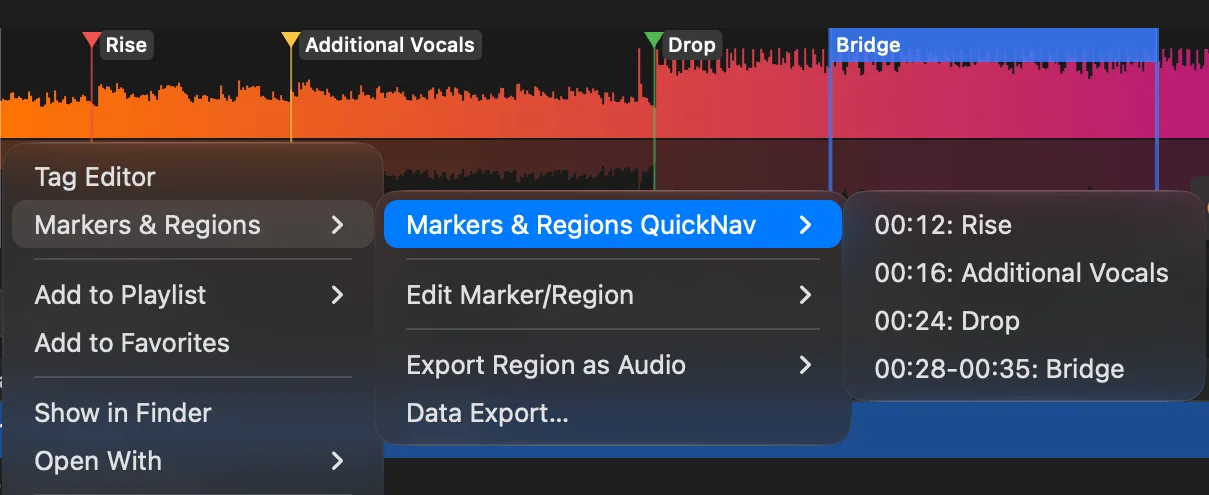
QuickNav lists all your markers and regions right in the context menu. A click on an entry takes you straight to that spot. Especially in files with many markings, it saves you from searching through the waveform.
Together with named markers the list becomes really clear: each entry shows its name, so you spot “Drop” or “Chapter 3” at a glance and jump there with a single click.
Export regions & loops as audio files
Perhaps the biggest highlight of this update: you can now export a region or loop directly as its own audio file. Mark the section you need and save exactly that part as a separate file, with no detour through an external editor.
Perfect for cutting samples out of a long recording, saving a single song from a DJ set, or isolating a quote from a podcast. What you mark in the waveform, you hold as a finished file seconds later.
Export markers & regions as CSV or JSON
Beyond audio, you can now export your markers and regions as structured data too, either as CSV or JSON. Names, timestamps and positions end up cleanly formatted in a file you can reuse in other programs.
Ideal for chapter marks, cue sheets, edit lists, or your own scripts and workflows. Open CSV directly in a spreadsheet, process JSON programmatically, your markings are no longer trapped inside Ampado.
An Ampado PRO feature
Markers & regions with naming, QuickNav and all export options are part of Ampado PRO. The free version (lite) includes the full player but not the advanced marker and region tools. Ampado PRO is a single purchase with no subscription, available on the Mac App Store.